How Browsers Work: A Simple Guide for Beginners
So to understand Browser internals we first have to understand “What actually happens after I type a URL and press Enter?“. For normal people browser opens a website but as developers we have to know “what happens behind the scenes?”. A lot of things actually happen behind the scenes quietly, quickly and smartly.
Let’s break it down slowly, visually, and without scary specs.
What Is a Browser?
A browser is not just an app that opens websites. A browser is a Downloader, Translator (understands HTML, CSS, JS), Painter (draws pixels on your screen), Coordinator (acts as a middleman between client and server).
Examples: Chrome, Firefox, Edge, Safari, etc.
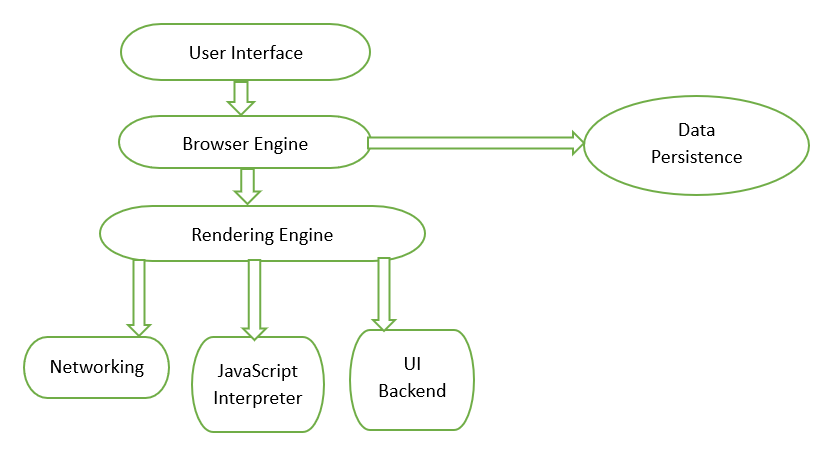
High level browser architecture
As you can see in above diagram at a high level, a browser has these parts:
User Interface (UI)
Whatever we can see in a browser on the screen is part of UI be it address bar, back/forward buttons, new tabs, buttons, or bookmarks. This is just the control panel, not the brain.
Browser Engine
This acts as a middle manager, connects UI with the rendering engine and tells the browser “what to load and when to update”.
Rendering Engine
One of the most important and this is where magic happens. Its job is to Take HTML + CSS + JS and Convert them into pixels.
Networking
This fetches HTML, CSS, JS, images using protocols like HTTP / HTTPS and Handles requests and responses.
JavaScript Engine
This executes JavaScript code and Handles clicks, logic, and events. Example engines: V8 (Chrome), SpiderMonkey (Firefox),
What are the two Engines Browser engine and Render engine?
Most of you must be wondering “why there are two engines? why not one?”. Its because, every engine has it’s own responsibilities.
Browser Engine
It controls flow of communication between User Interface and Rendering Engine. It interacts with UI and is a high level engine.
Rendering Engine
It draws the page and lets user see the page visually on screen basically it builds visuals. It is a low level engine.
Think of these engines as : Browser engine = Manager and Rendering engine = Artist.
What Happens After You Press Enter?
Now let us begin this wonderful story.
Step 1: Networking - Fetching Files
The browser sends a request to the server and downloads HTML, CSS, JavaScript, and Images.
Now it’s time to understand those files.
Step 2: HTML Parsing → DOM Creation
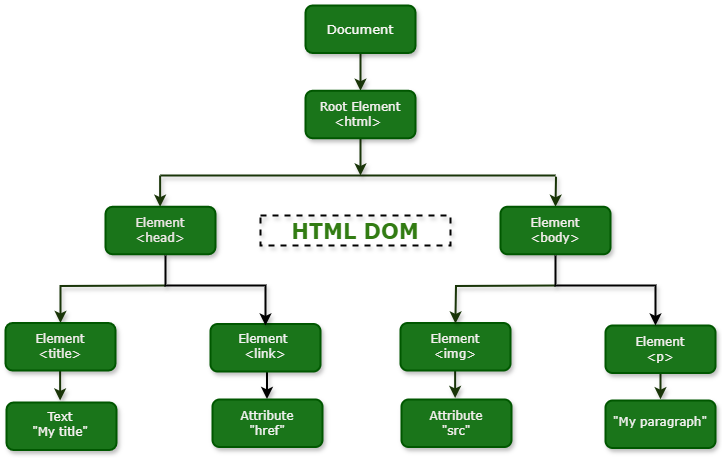
HTML is just text at first. The browser reads HTML line by line, converts tags into nodes and builds a tree structure.
This tree is called the DOM (Document Object Model). Not to worry hearing such a heavy word it is just a structure of the page.
Step 3: CSS Parsing → CSSOM Creation
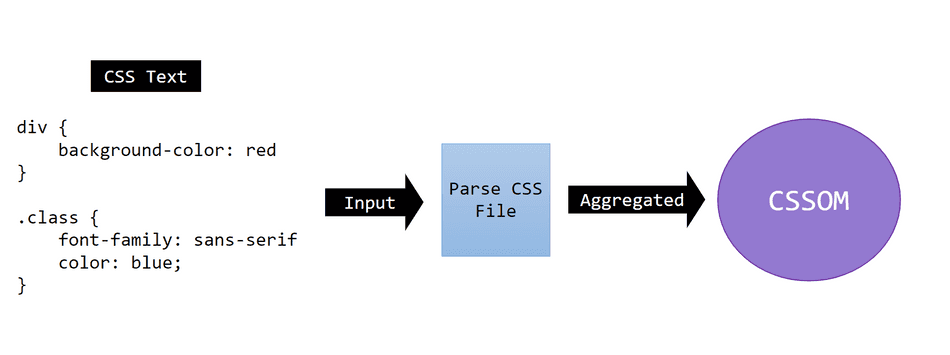
CSS is also just text. The browser reads CSS rules, breaks them into tokens and creates a tree called CSSOM.
Example: p{color: red;} Becomes selector: p, Property: color and Value: red
CSSOM is the style rule tree it is render-blocking. The browser must finish CSS before painting anything.
Step 4: DOM + CSSOM → Render Tree
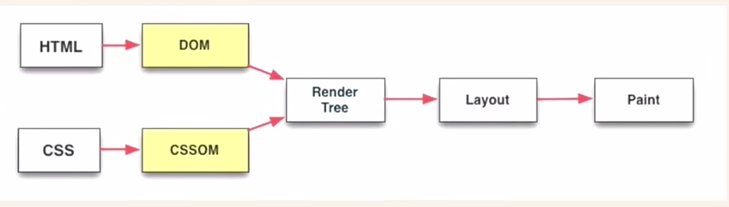
Now the browser combines DOM (structure) and CSSOM (styles). This creates the Render Tree.
Important:
Only visible elements are included
display: noneelements are skipped
Render Tree = what will actually appear on screen.
Step 5: Layout (Reflow)
In this step the browser calculates width, Height, Position of each element
Questions like:
Where does this div sit?
How wide is this image?
This step is called Layout (or Reflow).
Step 6: Painting
The most magical step, in which the browser finally paints pixels. Applies colors, borders and shadows. Then displays everything on the screen and Website appears!
What exactly is Parsing?
Parsing simply means “bringing something into meaningful pieces“. Example: 12+3 is parsed as
Number: 12, operator: +, Number: 3.
This is the same idea HTML is tags & text and CSS is selectors & styles.
Key Takeaways:
You don’t need to memorize everything.
Just Focus on the flow.
DOM is just structure.
CSSOM is styling rules to be followed.
Render Tree is the actual visible content.
Layout is positions of elements just like a mould.
Paint == pixels (The most beautiful part of frontend).
Conclusion
If it feels confusing, do not worry it is normal just read the blog again and refer to images. You’re doing it the right way by learning fundamentals.


